
Did you know Lichess can do this?! Board Editor
...more than meets the eye
Intro
Lichess is a great platform for playing chess, but it has so many features to help you become better at it, too. One of them is the Board Editor. And you might think that you know what it does, after all it edits boards, right?
Mostly, but it has some surprising features that can help improve your chess.
Setting up positions
I will go through this really fast because, yes, that's what Board Editor is supposed to do: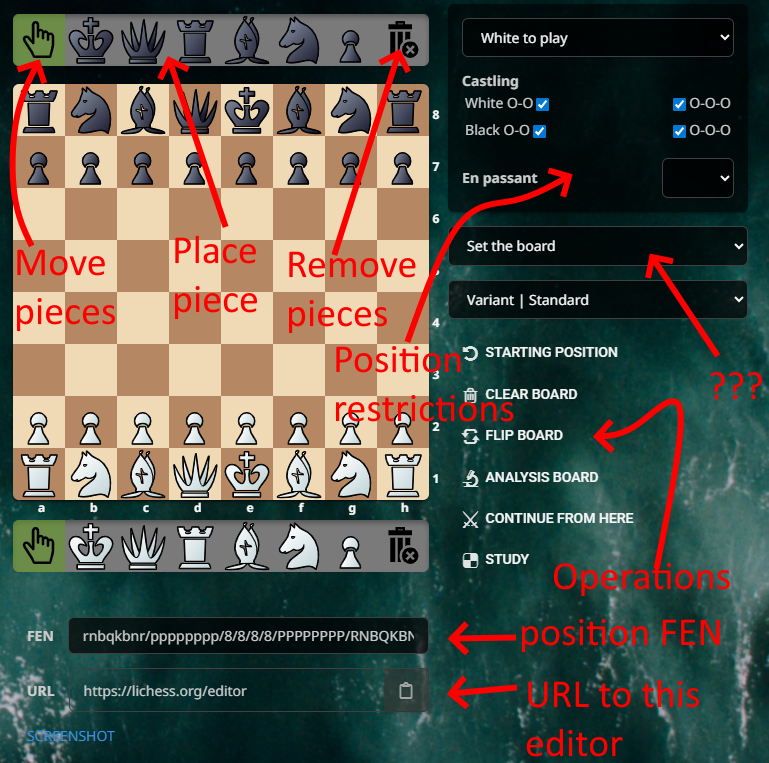 Some interesting tidbits here:
- you can "paint" with pieces, selecting a piece, clicking and dragging it over the board
- mouse right-click changes the color of the piece you have selected
- Continue from here will give the option to play against computer or challenge a friend from the position you have set up. Unfortunately, it will work only for Standard (which also includes Chess960)
- Study and Analysis Board all take the current position and open it in a study or the analysis.
The screenshot is the standard generation of a board with the pieces on it.
A mysterious dropdown
What is Set the board, though? It is a dropdown that allows you to choose between 140 opening positions and 180 endgame positions. WHAT?!
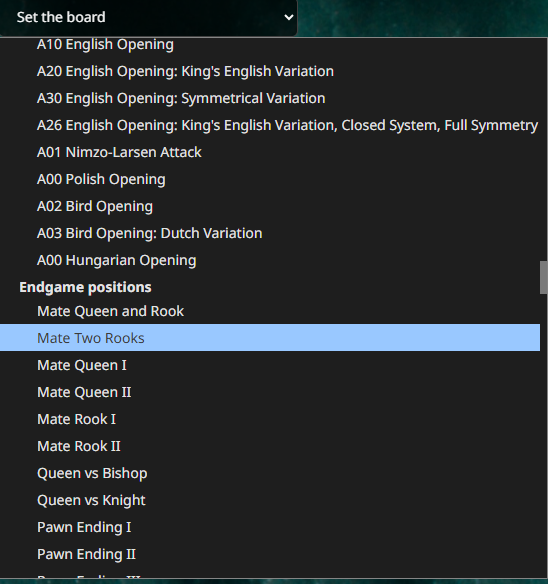
Yes, that means that if you take all of the endgame positions, for example, and add them as study chapters, you would need almost three full 64 chapters studies. If you ever thought "I am so bad at endgames, but I can't find a good resource for endgames" fret no more. You can just select a position and play it against the computer or check it against the Explorer table base.
OK, it's not the most convenient method to train endgames, but this is a clear named starting point for any of the standard positions.
Easy navigation
As you've seen, you can set up a position, then send it to Analysis or Study, but you can do the reverse as well. The standard operations from the Analysis hamburger menu (the three stacked horizontal lines button) allow this: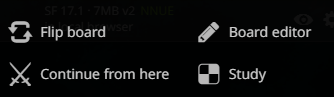 That means you can send a position to the different pages, change it with the various available tools of each.
In fact, LiChess Tools, the browser extension I am developing, adds a new operation to this page called Mirror which reverses the colors of the pieces on board. A common scenario is: you research a position and you are wondering if it can be part of a "system" that works for both Black and White. So you play the position in Analysis Board and you check Explorer for stats, then you send it to Board Editor, you Flip and Mirror the position, then send it back to Analysis Board, to see what the stats are for the same position with colors reversed.
Conclusion
The Board editor is not that used by people. They prefer to start from FENs or PGNs or make moves themselves rather than set up a board. Yet, because people just assume this it all it does, they miss the resource of setting up positions from the Set the board dropdown or the ease with which one can compare the same position with a piece somewhere else or a pawn in a different place, thus gaining more general intuition about the position.
How often have you used the Board Editor? Did you learn anything new from this post? Let me know!
The series
For a long time I was wondering why so few people on Lichess discuss the really cool features, like Explorer, Studies, Puzzles, Interactive Lessons, Tournaments, Chess classes and so many other things. I just recently realized that a lot of people just don't know about these at all. They just click on a lobby time control category and play, then play again, then leave.
I hope that I will do justice to this wonderful platform and explain some of these tools in a series of posts so you can use them for yourself. And I know people who did not know what Explorer was probably won't read my blogs, but on the off chance that they - that you - do, I hope they take some time to look deeper. This is a great place to be in!
You may also like
 TotalNoob69
An interesting response to the Sicilian/Scandi that does unusually well
... not objectively good, but statistically crushing CM HGabor
How titled players lie to you
This post is a word of warning for the average club player. As the chess world is becoming increasin… thibault
How I started building Lichess
I get this question sometimes. How did you decide to make a chess server? The truth is, I didn't. TotalNoob69
Did you know Lichess can do this?! Commands
... yes, Lichess has a command line TotalNoob69
Did you know Lichess can do this?! Opening Explorer and Tablebase
... do click on that little book button TotalNoob69